<?xml version="1.0" encoding="utf-8"?>
<feed xmlns="http://www.w3.org/2005/Atom" xmlns:media="http://search.yahoo.com/mrss/">
    <title>Merlin&#x27;s Cave</title>
    <link href="https://www.merlinscave.info/feed.xml" rel="self" />
    <link href="https://www.merlinscave.info" />
    <updated>2026-06-16T07:57:43+01:00</updated>
    <author>
        <name>Andy Lapping</name>
    </author>
    <id>https://www.merlinscave.info</id>

    <entry>
        <title>Building Profiles in C</title>
        <author>
            <name>Andy Lapping</name>
        </author>
        <link href="https://www.merlinscave.info/building-profiles-in-c.html"/>
        <id>https://www.merlinscave.info/building-profiles-in-c.html</id>

        <updated>2026-06-16T07:57:43+01:00</updated>
            <summary>
                <![CDATA[
                    The Problem This one is particularly applicable if you are using the Rhapsody Profile Builder but the underlying cause may hit you in other areas of modeling too. The Profile Builder uses a domain specific language to model different aspects of profiling in order to&hellip;
                ]]>
            </summary>
        <content type="html">
            <![CDATA[
                <h1>The Problem</h1>
<p>This one is particularly applicable if you are using the Rhapsody Profile Builder but the underlying cause may hit you in other areas of modeling too. </p>
<p>The Profile Builder uses a domain specific language to model different aspects of profiling in order to generate the lengthy textual files Rhapsody uses. One of these is generating property files. To achive that is uses nested new terms based on Class, mirroring the Rhapsody property structure: Subject, Metaclass and Property.</p>
<p>The problem is if you are modeling a profile for Rhapsody in C then you are likely using RiC and have created a RiC project. Rhapsody will not allow you to add a 'class' to another 'class' in such a project and so when you add a Subject - you get no Add New menu for it despite the Subject term having its own custom Add New Menu definition - Rhapsody cheerfully ignores that and decides that since you have no applicable model elements to add, it will hide the Add New Menu.</p>
<h2>The solutions:</h2>
<p>1. Use RiC++ to build the profile (the profile itself can be C by changing the language)</p>
<p>2. If you are using C then temporarily change the project language to C++</p>
<p>3. Avoid the Rhapsody Add New Menu altogether - the Rhapsody Power Pack has an Add Model Element helper which is far easier to use than that menu anyway.</p>
<p> </p>
<p> </p>
            ]]>
        </content>
    </entry>
    <entry>
        <title>Missing Add New Menu</title>
        <author>
            <name>Andy Lapping</name>
        </author>
        <link href="https://www.merlinscave.info/missing-add-new-menu.html"/>
        <id>https://www.merlinscave.info/missing-add-new-menu.html</id>

        <updated>2026-06-04T07:54:56+01:00</updated>
            <summary>
                <![CDATA[
                    What on Earth ? I had a very interesting situation this week regarding the use of custom profiles that define their own Add New Menu. In this case I was using the Profile Builder to update an AUTOSAR profile. I added a new term called&hellip;
                ]]>
            </summary>
        <content type="html">
            <![CDATA[
                <h2>What on Earth ? </h2>
<p>I had a very interesting situation this week regarding the use of custom profiles that define their own Add New Menu. In this case I was using the Profile Builder to update an AUTOSAR profile. I added a new term called Subject and then tried to add a Metaclass to it, but no Add New Menu showed up at all. It showed up in every other model - just not this one. My buddy Ryan in IBM found the root cause - the model language was C whilst the language of the profile was the default C++.</p>
<p>Now this is of course a defect - the language of the Units in the model should have no effect at all on the Add New Menu and I'm sure IBM will fix it but in the meantime, if this happens to you, here are two workarounds:</p>
<h3>1. Change the Project Language</h3>
<p>Temporarily of course!</p>
<p>1. Right click the project and select Edit Unit</p>
<p>2. Change the language to C++ (answer <strong>NO</strong> when asked if you also want to change the language of all sub-units)</p>
<p>Then you get your Add New Menu back. Once you've added one of your New Terms you can always add another one easily later without the Add New Menu by clicking the <strong>category </strong>(curiously the defect also removes the 'add another one of these' menu on the artifact itelf as well as its keyboard shortcut (Insert)</p>
<p>3. Once you've added one element - change the language back.</p>
<h3>2. Use the Power Pack</h3>
<p>I stopped using the Add New Menu a while back anyway - it got frustrating trying to find the right sub menu for an artifact and also profiles like SysML completely hijack the Add New Menu and obfuscate anything else when trying to add elements to a base term like Package.</p>
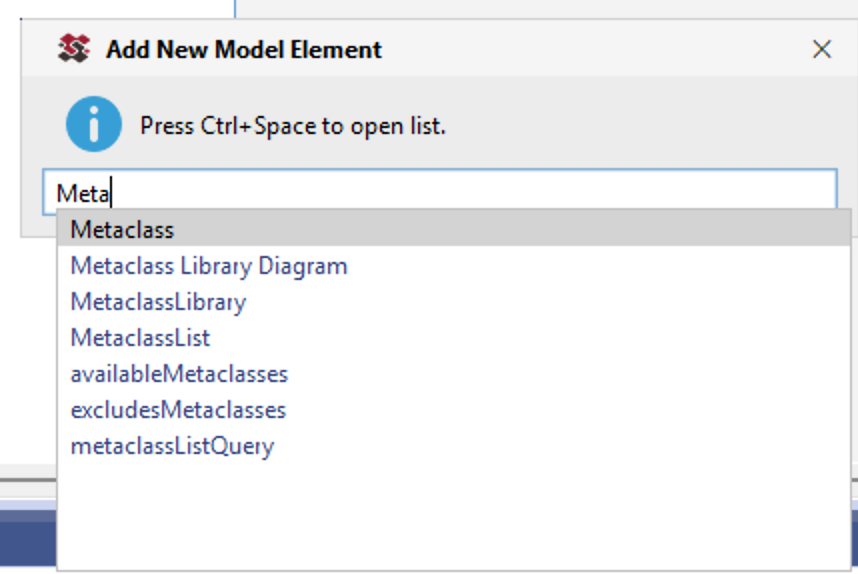
<p>Which is why I added the Add New Model Element helper to the Power Pack. You can launch it from any element at all using a helper menu - or if you are lucky enough to be on Rhapsody 10+ already then you can use a keybaord shortcut to launch it which is even more convenient. Then you can simply type a few characters, hit Ctrl-Space and add whatever you need - its a huundred times faster than the clunky Add New Menu:</p>
<h2><figure class="post__image"><img loading="lazy"  src="https://www.merlinscave.info/media/posts/64/Add-New-Model-Element.png" alt="Add New Model Element Dialog" width="858" height="574" sizes="(max-width: 48em) 100vw, 768px" srcset="https://www.merlinscave.info/media/posts/64/responsive/Add-New-Model-Element-xs.png 300w ,https://www.merlinscave.info/media/posts/64/responsive/Add-New-Model-Element-sm.png 480w ,https://www.merlinscave.info/media/posts/64/responsive/Add-New-Model-Element-md.png 768w ,https://www.merlinscave.info/media/posts/64/responsive/Add-New-Model-Element-lg.png 1024w ,https://www.merlinscave.info/media/posts/64/responsive/Add-New-Model-Element-xl.png 1360w ,https://www.merlinscave.info/media/posts/64/responsive/Add-New-Model-Element-2xl.png 1600w"></figure></h2>
<p> </p>
            ]]>
        </content>
    </entry>
    <entry>
        <title>Running Rhapsody on Apple Silicon</title>
        <author>
            <name>Andy Lapping</name>
        </author>
        <link href="https://www.merlinscave.info/running-rhapsody-on-apple-silicon.html"/>
        <id>https://www.merlinscave.info/running-rhapsody-on-apple-silicon.html</id>

        <updated>2026-03-26T06:45:50+00:00</updated>
            <summary>
                <![CDATA[
                    Now don't get too excited - this post isnt about running Rhapsody directly on a Mac but more anecdotal (Your Mileage May Vary!) of a recent experience of running Rhapsody inside Parallels on a Mac - specifically one of the newer machines that uses Apple&hellip;
                ]]>
            </summary>
        <content type="html">
            <![CDATA[
                <p>Now don't get too excited - this post isnt about running Rhapsody directly on a Mac but more anecdotal (Your Mileage May Vary!) of a recent experience of running Rhapsody inside Parallels on a Mac - specifically one of the newer machines that uses Apple silicon instead of Intel. </p>
<p>I experienced quite a few crashes when using the Rhapsody API but they were for the most part non-deterministic. After enabling windows crash dumps I was finally able to track down the cause. </p>
<p>You may be using another virtualization engine but will likely experience the same issues baecause the root cause isn't the Virtual Machine but the ARM64 version of windows thats running on it. Windows runs x64 apps on ARM64 using a compatibility layer called WOW64 that (amongst other things) redirects system calls. Because Rhapsody is not a native ARM64 application, its running on a hybrid mixed ARM64EC/AMD64 process.</p>
<p>When vc_redist64.exe runs (that is the Microsoft redistributable libararies that Rhapsody requires) on ARM Windows it installs the ARM64EC flavoured mfc140.dll into System32 instead of the pure x64 version. Rhapsody then loads the wrong flavour and some processes are not initialised correctly - resulting in Rhapsody crashes. Its indeterminate becauser the intialization is affected by threading and timing differences. </p>
<p>The fix (at least for me) was a simple one - install Rhapsody on an Intel machine and then copy the following dlls from that machine (from the Windows System32 folder) into the Rhapsody folder on Parallels. Windows DLL search order will prefer the local copy over System32 - and hey presto - far fewer Rhapsody crashes.</p>
<ul>
<li><address><span style="color: #3598db;">mfc140.dll</span></address></li>
<li><address><span style="color: #3598db;">mfc140u.dll</span></address></li>
<li><address><span style="color: #3598db;">mfcm140.dll</span></address></li>
<li><address><span style="color: #3598db;">mfcm140u.dll</span></address></li>
</ul>
            ]]>
        </content>
    </entry>
    <entry>
        <title>Elements with Duplicate Names</title>
        <author>
            <name>Andy Lapping</name>
        </author>
        <link href="https://www.merlinscave.info/elements-with-duplicate-names.html"/>
        <id>https://www.merlinscave.info/elements-with-duplicate-names.html</id>

        <updated>2026-02-19T08:06:51+00:00</updated>
            <summary>
                <![CDATA[
                    Overview If you try to add a model element (or rename a model element) and another model element of the same underlying type exists anywhere else in the model, Rhapsody displays a warning. For example if you have a Block named B in a package&hellip;
                ]]>
            </summary>
        <content type="html">
            <![CDATA[
                <h1>Overview</h1>
<p>If you try to add a model element (or rename a model element) and another model element of the same underlying type exists anywhere else in the model, Rhapsody displays a warning. For example if you have a Block named B in a package and you try to add another Block (or an Interface Block, Flow Specification and so on which have the same underlying type) into another package with the name B then Rhapsody displays a warning:</p>
<figure class="post__image"><img loading="lazy"  src="https://www.merlinscave.info/media/posts/62/Warning.png" alt="" width="394" height="222" sizes="(max-width: 48em) 100vw, 768px" srcset="https://www.merlinscave.info/media/posts/62/responsive/Warning-xs.png 300w ,https://www.merlinscave.info/media/posts/62/responsive/Warning-sm.png 480w ,https://www.merlinscave.info/media/posts/62/responsive/Warning-md.png 768w ,https://www.merlinscave.info/media/posts/62/responsive/Warning-lg.png 1024w ,https://www.merlinscave.info/media/posts/62/responsive/Warning-xl.png 1360w ,https://www.merlinscave.info/media/posts/62/responsive/Warning-2xl.png 1600w"></figure>
<p>Whilst this is very useful - it can be disabled by setting the following property at project level:</p>
<pre>General.Model.WarnForDuplicates</pre>
<p>Note that in some older versions of Rhapsody, trying to add a new model element (with a duplicate name) via the API without this property set would fail badly - since there is no way for the API to respond to a warning dialog! Thankfully in more recent versions this is not the case adding elements with duplicate names through the API ignores that property and adds them anyway.</p>
<p> </p>
            ]]>
        </content>
    </entry>
    <entry>
        <title>Expanding Keywords</title>
        <author>
            <name>Andy Lapping</name>
        </author>
        <link href="https://www.merlinscave.info/expanding-keywords.html"/>
        <id>https://www.merlinscave.info/expanding-keywords.html</id>

        <updated>2025-07-18T14:23:50+01:00</updated>
            <summary>
                <![CDATA[
                    Overview When obtaining information from Rhapsody properties through the API, the IRPApplication class has a very useful function: This will automatically replce any $keywords such as $OMROOT with their real values. But this also expands any system environment variable, or even custom variables you add&hellip;
                ]]>
            </summary>
        <content type="html">
            <![CDATA[
                <h1>Overview</h1>
<p>When obtaining information from Rhapsody properties through the API, the IRPApplication class has a very useful function:</p>
<figure class="post__image"><img loading="lazy"  src="https://www.merlinscave.info/media/posts/61/2025-07-18_14-14-06.png" alt="" width="1264" height="86" sizes="(max-width: 48em) 100vw, 768px" srcset="https://www.merlinscave.info/media/posts/61/responsive/2025-07-18_14-14-06-xs.png 300w ,https://www.merlinscave.info/media/posts/61/responsive/2025-07-18_14-14-06-sm.png 480w ,https://www.merlinscave.info/media/posts/61/responsive/2025-07-18_14-14-06-md.png 768w ,https://www.merlinscave.info/media/posts/61/responsive/2025-07-18_14-14-06-lg.png 1024w ,https://www.merlinscave.info/media/posts/61/responsive/2025-07-18_14-14-06-xl.png 1360w ,https://www.merlinscave.info/media/posts/61/responsive/2025-07-18_14-14-06-2xl.png 1600w"></figure>
<p>This will automatically replce any $keywords such as $OMROOT with their real values. </p>
<p>But this also expands any system environment variable, or even custom variables you add to your Rhapsody.ini file! </p>
<p>For example:</p>
<figure class="post__image"><img loading="lazy"  src="https://www.merlinscave.info/media/posts/61/2025-07-18_14-22-48.png" alt="" width="544" height="138" sizes="(max-width: 48em) 100vw, 768px" srcset="https://www.merlinscave.info/media/posts/61/responsive/2025-07-18_14-22-48-xs.png 300w ,https://www.merlinscave.info/media/posts/61/responsive/2025-07-18_14-22-48-sm.png 480w ,https://www.merlinscave.info/media/posts/61/responsive/2025-07-18_14-22-48-md.png 768w ,https://www.merlinscave.info/media/posts/61/responsive/2025-07-18_14-22-48-lg.png 1024w ,https://www.merlinscave.info/media/posts/61/responsive/2025-07-18_14-22-48-xl.png 1360w ,https://www.merlinscave.info/media/posts/61/responsive/2025-07-18_14-22-48-2xl.png 1600w"></figure>
<p>Another variable which may be of use that is not in the environment variables but is built into Windows is <strong>$USERNAME</strong> which Rhapsody expands to your windows user name.</p>
            ]]>
        </content>
    </entry>
    <entry>
        <title>Qualifying Context Pattern Plugin Methods</title>
        <author>
            <name>Andy Lapping</name>
        </author>
        <link href="https://www.merlinscave.info/qualifying-context-pattern-plugin-methods.html"/>
        <id>https://www.merlinscave.info/qualifying-context-pattern-plugin-methods.html</id>

        <updated>2025-07-11T16:26:01+01:00</updated>
            <summary>
                <![CDATA[
                    Calling Plugins from Context Patterns As you may already be aware you can call java plugin methods from within context patterns, for example: {uc}pluginMethod:getUseCases But you may not know that you can qualify that with a specific plugin. Doing so has two advantages: To qualify&hellip;
                ]]>
            </summary>
        <content type="html">
            <![CDATA[
                <h2>Calling Plugins from Context Patterns</h2>
<p>As you may already be aware you can call java plugin methods from within context patterns, for example:</p>
<p class="msg msg--highlight ">{uc}pluginMethod:<strong>getUseCases</strong></p>
<p>But you may not know that you can qualify that with a specific plugin. Doing so has two advantages:</p>
<ol>
<li>Performance. If you don't qualify it then Rhapsody looks in every currently loaded plugin for a public method with that name. If you qualify it then Rhapsody only has to check that plugin.</li>
<li>Name Clashes. If another loaded plugin has a public method with the same name as the one you want to call its a crapshoot - Rhapsody will use the first one it finds.</li>
</ol>
<h2>Qualifying Method Calls</h2>
<p>To qualify the method simply prefix the method with the name of the plugin and a colon. That is the name of the plugin from the HEP file that loads it (not the java class name). For example:</p>
<p class="msg msg--highlight ">{uc}pluginMethod:<strong>MyPlugin:getUseCases</strong></p>
<p> </p>
            ]]>
        </content>
    </entry>
    <entry>
        <title>WebView2</title>
        <author>
            <name>Andy Lapping</name>
        </author>
        <link href="https://www.merlinscave.info/web-view-2.html"/>
        <id>https://www.merlinscave.info/web-view-2.html</id>

        <updated>2025-06-20T15:43:22+01:00</updated>
            <summary>
                <![CDATA[
                    What is WebView2 ? WebView2 is a control provided by Microsoft that allows applications to embed web technologies into their apps (it uses Microsoft Edge as the rendering engine). https://learn.microsoft.com/en-us/microsoft-edge/webview2/ Historically Rhapsody used an embedded Internet Explorer whenever it needed to display web content (such&hellip;
                ]]>
            </summary>
        <content type="html">
            <![CDATA[
                <h1>What is WebView2 ?</h1>
<p>WebView2 is a control provided by Microsoft that allows applications to embed web technologies into their apps (it uses Microsoft Edge as the rendering engine).</p>
<p><a href="https://learn.microsoft.com/en-us/microsoft-edge/webview2/" target="_blank" rel="noopener noreferrer">https://learn.microsoft.com/en-us/microsoft-edge/webview2/</a></p>
<p>Historically Rhapsody used an embedded Internet Explorer whenever it needed to display web content (such as the Welcome Page or a login page for RMM). Starting in version 10 it has now switched to using WebView2. </p>
<h2>Why Does it Matter ? </h2>
<p>For the most part it shouldn't - you won't even notice it unless you are looking in the task manager and you're wondering what all these WebView2 Manager processes are. WebView2 is installed by default on Windows 11 but if you are using an earlier version or Windows Server then it isn't and you'll usually need to download it from Microsoft because Rhapsody doesn't ship it. And thats when it might matter - if you download it yourself then it may not be the version Rhapsody expects and this can cause crashes whenever Rhapsody needs to display a web page, which is more often than you think. Even <em>Help &gt; About</em> is a web page !</p>
<p>By default Rhapsody displays the Welcome Page whenever you launch the appication - which if you have a WebView2 problem may cause Rhapsody to crash instantly (you can stop that by changing the setting in your ini file: SHOW_WIZARD_AT_STARTUP=FALSE). </p>
<p>If you have a problem with web page content not showing up or crashing Rhapsody - contact IBM Support ! </p>
            ]]>
        </content>
    </entry>
    <entry>
        <title>Viewpoints in Queries</title>
        <author>
            <name>Andy Lapping</name>
        </author>
        <link href="https://www.merlinscave.info/viewpoints.html"/>
        <id>https://www.merlinscave.info/viewpoints.html</id>

        <updated>2025-05-22T15:13:07+01:00</updated>
            <summary>
                <![CDATA[
                    Viewpoints in Rhapsody Views and Viewpoints are part of the SysML Profile and on the surface they seem kind of pointless since they don't do anything - or do they? Did you know you can use a Viewpoint in a query? (Which can then be&hellip;
                ]]>
            </summary>
        <content type="html">
            <![CDATA[
                <h1>Viewpoints in Rhapsody</h1>
<p>Views and Viewpoints are part of the SysML Profile and on the surface they seem kind of pointless since they don't do anything - or do they?</p>
<p>Did you know you can use a Viewpoint in a query? (Which can then be used in tables or to filter the model browser / diagrams). Queries (and table layouts since the dialog is unified) have a field for Viewpoints:</p>
<figure class="post__image"><img loading="lazy"  src="https://www.merlinscave.info/media/posts/58//2025-05-22_15-09-34.png" alt="" width="990" height="556" sizes="(max-width: 48em) 100vw, 768px" srcset="https://www.merlinscave.info/media/posts/58//responsive/2025-05-22_15-09-34-xs.png 300w ,https://www.merlinscave.info/media/posts/58//responsive/2025-05-22_15-09-34-sm.png 480w ,https://www.merlinscave.info/media/posts/58//responsive/2025-05-22_15-09-34-md.png 768w ,https://www.merlinscave.info/media/posts/58//responsive/2025-05-22_15-09-34-lg.png 1024w ,https://www.merlinscave.info/media/posts/58//responsive/2025-05-22_15-09-34-xl.png 1360w ,https://www.merlinscave.info/media/posts/58//responsive/2025-05-22_15-09-34-2xl.png 1600w"></figure>
<h2> </h2>
<h2>Constructing Viewpoints</h2>
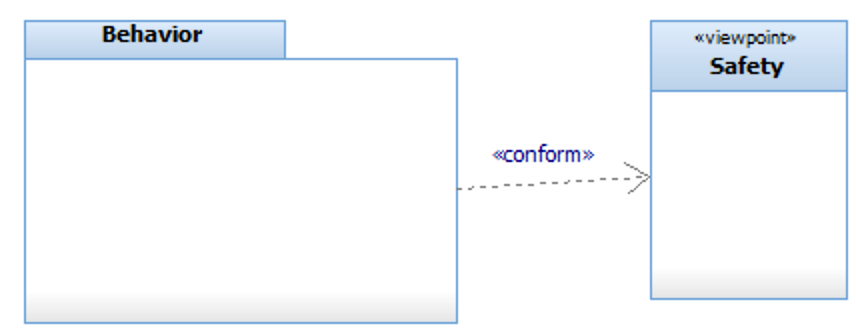
<p>To create a Viewpoint simply add one in the model (either in a package or in a View which is nothing more than a new term based on package) and then add the elements that conform to it using a &lt;&lt;conform&gt;&gt; dependency:</p>
<figure class="post__image"><img loading="lazy"  src="https://www.merlinscave.info/media/posts/58/2025-05-22_15-12-52.png" alt="" width="856" height="332" sizes="(max-width: 48em) 100vw, 768px" srcset="https://www.merlinscave.info/media/posts/58/responsive/2025-05-22_15-12-52-xs.png 300w ,https://www.merlinscave.info/media/posts/58/responsive/2025-05-22_15-12-52-sm.png 480w ,https://www.merlinscave.info/media/posts/58/responsive/2025-05-22_15-12-52-md.png 768w ,https://www.merlinscave.info/media/posts/58/responsive/2025-05-22_15-12-52-lg.png 1024w ,https://www.merlinscave.info/media/posts/58/responsive/2025-05-22_15-12-52-xl.png 1360w ,https://www.merlinscave.info/media/posts/58/responsive/2025-05-22_15-12-52-2xl.png 1600w"></figure>
<p>You can have as many &lt;&lt;conform&gt;&gt; dependencies as you want. The query result then returns any element that conforms to the viewpoint, and all of its children, and the viewpoint and any of the &lt;&lt;conform&gt;&gt; dependencies. </p>
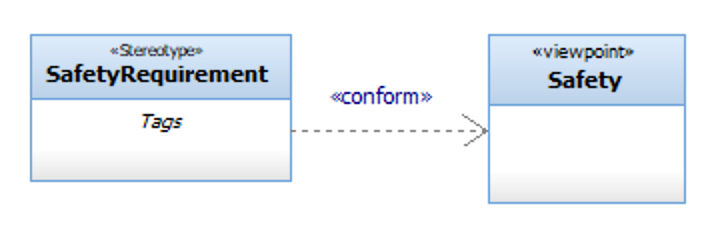
<p>You can also use a stereotype instead of / in addition to regular model elements.Which is great for your own stereotypes but no so great for predefined ones like &lt;&lt;Block&gt;&gt; which are read-only (in fact this entire mechanism really should have been implemented the other way around - so viewpoints are a perspective on the model without having to change the model elements themselves). </p>
<figure class="post__image"><img loading="lazy"  style="color: var(--text-primary-color); font-family: var(--editor-font-family); font-size: inherit; font-weight: var(--font-weight-normal);" src="https://www.merlinscave.info/media/posts/58/2025-05-22_15-16-30.png" alt="" width="708" height="228" sizes="(max-width: 48em) 100vw, 768px" srcset="https://www.merlinscave.info/media/posts/58/responsive/2025-05-22_15-16-30-xs.png 300w ,https://www.merlinscave.info/media/posts/58/responsive/2025-05-22_15-16-30-sm.png 480w ,https://www.merlinscave.info/media/posts/58/responsive/2025-05-22_15-16-30-md.png 768w ,https://www.merlinscave.info/media/posts/58/responsive/2025-05-22_15-16-30-lg.png 1024w ,https://www.merlinscave.info/media/posts/58/responsive/2025-05-22_15-16-30-xl.png 1360w ,https://www.merlinscave.info/media/posts/58/responsive/2025-05-22_15-16-30-2xl.png 1600w"></figure>
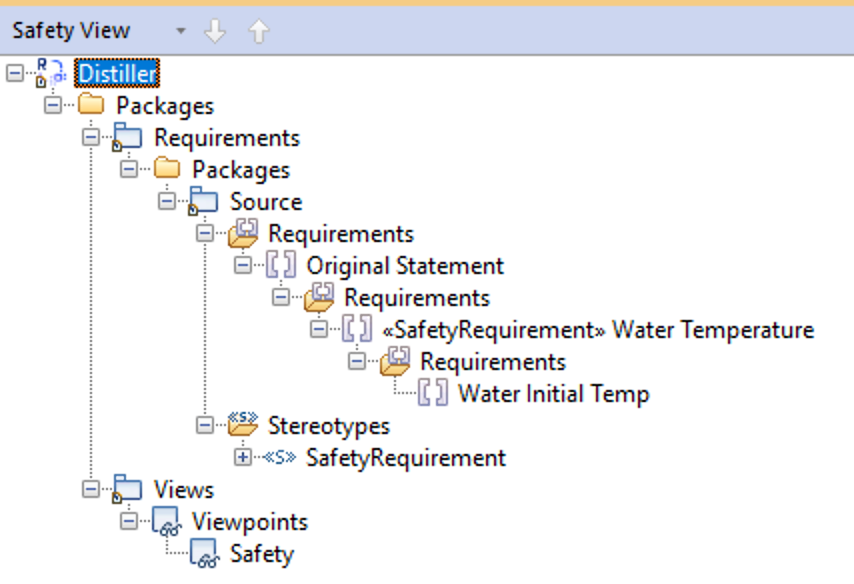
<p>Any elements that have that stereotype will be then be included in the query result (along with their children) <span style="color: var(--text-primary-color); font-family: var(--editor-font-family); font-size: inherit; font-weight: var(--font-weight-normal);">and the stereotype. And because of the way that Rhapsody displays elements in the browser - all of their parents as well:</span></p>
<figure class="post__image"><img loading="lazy"  src="https://www.merlinscave.info/media/posts/58/2025-05-22_15-19-05.png" alt="" width="854" height="584" sizes="(max-width: 48em) 100vw, 768px" srcset="https://www.merlinscave.info/media/posts/58/responsive/2025-05-22_15-19-05-xs.png 300w ,https://www.merlinscave.info/media/posts/58/responsive/2025-05-22_15-19-05-sm.png 480w ,https://www.merlinscave.info/media/posts/58/responsive/2025-05-22_15-19-05-md.png 768w ,https://www.merlinscave.info/media/posts/58/responsive/2025-05-22_15-19-05-lg.png 1024w ,https://www.merlinscave.info/media/posts/58/responsive/2025-05-22_15-19-05-xl.png 1360w ,https://www.merlinscave.info/media/posts/58/responsive/2025-05-22_15-19-05-2xl.png 1600w"></figure>
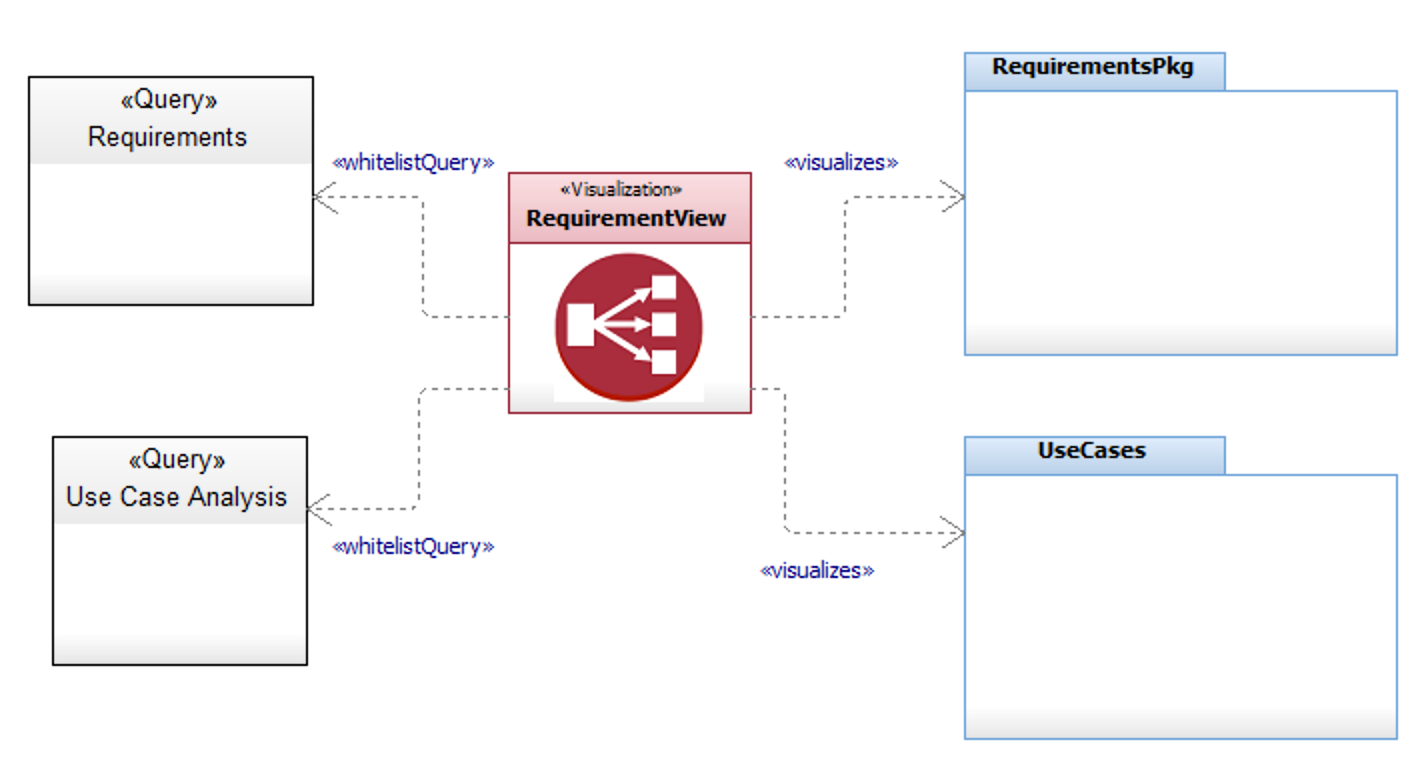
<p>So Viewpoints are not <em>totally</em> useless but you have to modify the model elements in the viewpoint to use them and they do include elements you may not want to see. The Model Visualizer in my Power Pack solves both of those problems by having a <em>Visualization</em> point <em>at</em> the elements you want to include (the Scope) along with filters - which can be simple type lists or queries and supports black / whitelists (so either 'include everything but this' or 'only include this'). Because it uses queries you can use any query feature supported by Rhapsody such as 'has a tag with this value')</p>
<figure class="post__image"><img loading="lazy"  src="https://www.merlinscave.info/media/posts/58/2025-05-22_15-41-36.png" alt="" width="1414" height="772" sizes="(max-width: 48em) 100vw, 768px" srcset="https://www.merlinscave.info/media/posts/58/responsive/2025-05-22_15-41-36-xs.png 300w ,https://www.merlinscave.info/media/posts/58/responsive/2025-05-22_15-41-36-sm.png 480w ,https://www.merlinscave.info/media/posts/58/responsive/2025-05-22_15-41-36-md.png 768w ,https://www.merlinscave.info/media/posts/58/responsive/2025-05-22_15-41-36-lg.png 1024w ,https://www.merlinscave.info/media/posts/58/responsive/2025-05-22_15-41-36-xl.png 1360w ,https://www.merlinscave.info/media/posts/58/responsive/2025-05-22_15-41-36-2xl.png 1600w"></figure>
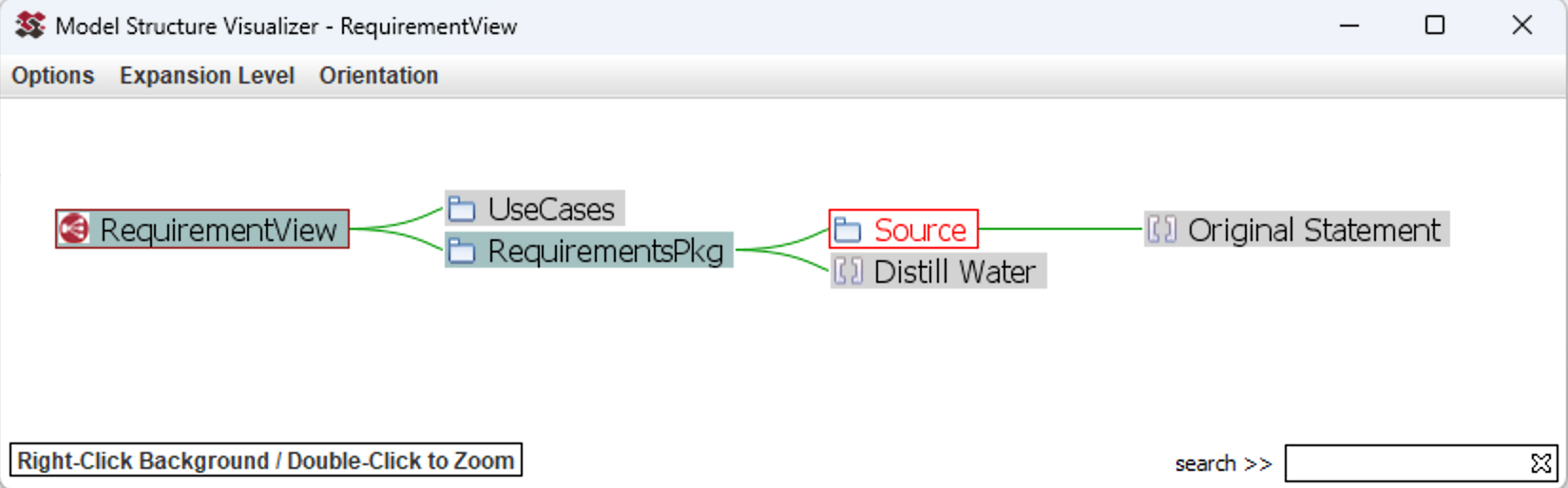
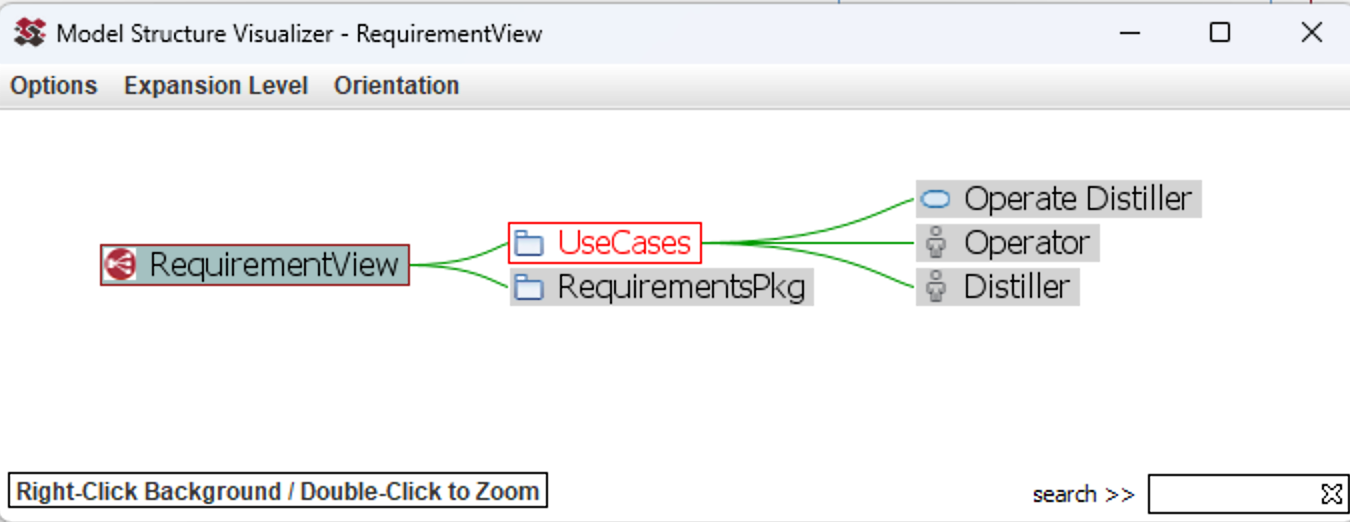
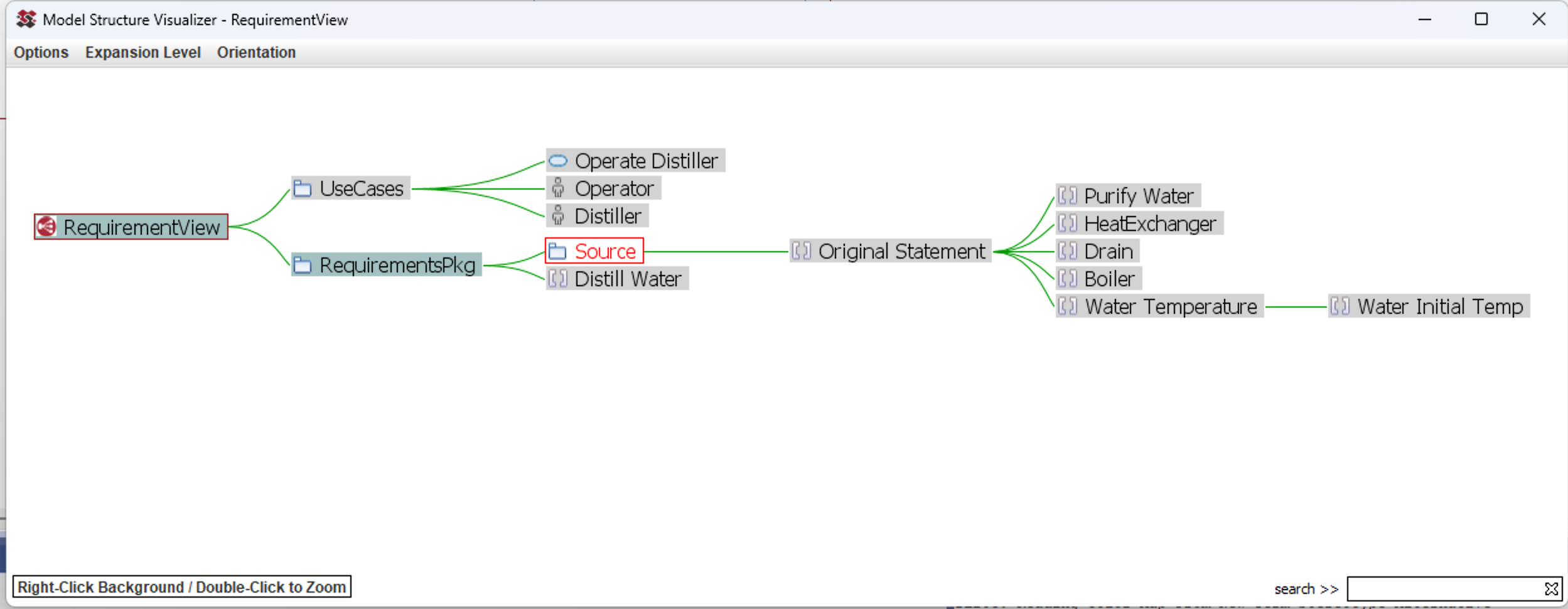
<p>You can then launch a dynamic visualization engine to browse the filtered model (and of course you can navigate back to Rhapsody from any node in the graph):</p>
<figure class="post__image"><img loading="lazy"  src="https://www.merlinscave.info/media/posts/58/2025-05-22_15-54-24.png" alt="" width="1650" height="514" sizes="(max-width: 48em) 100vw, 768px" srcset="https://www.merlinscave.info/media/posts/58/responsive/2025-05-22_15-54-24-xs.png 300w ,https://www.merlinscave.info/media/posts/58/responsive/2025-05-22_15-54-24-sm.png 480w ,https://www.merlinscave.info/media/posts/58/responsive/2025-05-22_15-54-24-md.png 768w ,https://www.merlinscave.info/media/posts/58/responsive/2025-05-22_15-54-24-lg.png 1024w ,https://www.merlinscave.info/media/posts/58/responsive/2025-05-22_15-54-24-xl.png 1360w ,https://www.merlinscave.info/media/posts/58/responsive/2025-05-22_15-54-24-2xl.png 1600w"></figure>
<figure class="post__image"><img loading="lazy"  src="https://www.merlinscave.info/media/posts/58/2025-05-22_15-53-41.png" alt="" width="1350" height="522" sizes="(max-width: 48em) 100vw, 768px" srcset="https://www.merlinscave.info/media/posts/58/responsive/2025-05-22_15-53-41-xs.png 300w ,https://www.merlinscave.info/media/posts/58/responsive/2025-05-22_15-53-41-sm.png 480w ,https://www.merlinscave.info/media/posts/58/responsive/2025-05-22_15-53-41-md.png 768w ,https://www.merlinscave.info/media/posts/58/responsive/2025-05-22_15-53-41-lg.png 1024w ,https://www.merlinscave.info/media/posts/58/responsive/2025-05-22_15-53-41-xl.png 1360w ,https://www.merlinscave.info/media/posts/58/responsive/2025-05-22_15-53-41-2xl.png 1600w"></figure>
<figure class="post__image"><img loading="lazy"  src="https://www.merlinscave.info/media/posts/58/2025-05-22_15-55-07.png" alt="" width="2498" height="970" sizes="(max-width: 48em) 100vw, 768px" srcset="https://www.merlinscave.info/media/posts/58/responsive/2025-05-22_15-55-07-xs.png 300w ,https://www.merlinscave.info/media/posts/58/responsive/2025-05-22_15-55-07-sm.png 480w ,https://www.merlinscave.info/media/posts/58/responsive/2025-05-22_15-55-07-md.png 768w ,https://www.merlinscave.info/media/posts/58/responsive/2025-05-22_15-55-07-lg.png 1024w ,https://www.merlinscave.info/media/posts/58/responsive/2025-05-22_15-55-07-xl.png 1360w ,https://www.merlinscave.info/media/posts/58/responsive/2025-05-22_15-55-07-2xl.png 1600w"></figure>
<p> </p>
<p> </p>
<p> </p>
<p> </p>
<p> </p>
            ]]>
        </content>
    </entry>
    <entry>
        <title>Avoiding the Property Race with Conditional Properties</title>
        <author>
            <name>Andy Lapping</name>
        </author>
        <link href="https://www.merlinscave.info/avoding-the-property-race-with-conditional-properties.html"/>
        <id>https://www.merlinscave.info/avoding-the-property-race-with-conditional-properties.html</id>

        <updated>2025-05-19T08:52:22+01:00</updated>
            <summary>
                <![CDATA[
                    The Property Race When Rhapsody loads profiles it also loads any property files at that time. If a property is defined more than once (which may happen when you have multiple profiles) then there is a race condition - and there is no way to&hellip;
                ]]>
            </summary>
        <content type="html">
            <![CDATA[
                <h1>The Property Race</h1>
<p>When Rhapsody loads profiles it also loads any property files at that time. If a property is defined more than once (which may happen when you have multiple profiles) then there is a race condition - and there is no way to determine which property file will 'win' and which value will be used.</p>
<h2>Conditional Properties</h2>
<p>Conditional properties are extremely powerful in Rhapsody and allow properties to take their values from other properties (or even the rhapsody ini, environment variables and other sources).</p>
<p>Conditional properties may include an instruction to Rhapsody to look in all currently loaded profiles for a named property and combine all of their values into one - thereby avoiding the race condition (so long as all of the profiles use the same base conditional property) </p>
<p>The syntax is simply to prefix the original property key with Profiles:: and then Rhapsody will look in all profiles for a property with that name and a prefix of the profile name in which it's looking (which is how each profile defines it's own value).</p>
<p>Rhapsody uses this mechanism in it's own <em><strong>General::Model::VolatileProperties</strong></em> property. It starts with the following - which is the indicator to Rhapsody to evaulate this property and not just use it as a string </p>
<p class="msg msg--success">?&lt;IsConditionalProperty&gt;</p>
<p>Next there are two more parts. The first reads another property:</p>
<p class="msg msg--success">$&lt;General::Model::DefaultVolatileProperties&gt;,</p>
<p>And the second checks all loaded profiles for a<strong> General::Model::VolatileProperties </strong>property (except that the VolatileProperties part should be prefixed by the profile name)</p>
<p class="msg msg--success">$&lt;Profiles::General::Model::VolatileProperties::,&gt;</p>
<h3>Example</h3>
<p>Another good example is custom model browsers. Rhapsody has a property <strong><em>AdditionalBrowseHierarchy</em></strong> where those additional browsers are defined. But if you have multiple profiles and they all define browsers using that same property - only one profile will win and only it's custom browsers will show up. But if you use the <em>Profiles</em> conditional property then you can get them all.</p>
<p>I use this in my Profile Builder tool - custom browsers are automatically generated as two properties - one for the AdditionalBrowseHierarchy and a second AdditionalBrowseHierarchy with the profile name prefix. That means that any profiles you create using that tool will all be compatible with other profiles.</p>
<p>For example here is a snippet from it's own HEP file (the Profile Builder profile has custom browsers too) - these two properties are under Model::Project since this is part of a custom browser definition at project level:</p>
<p>This first property tells Rhapsody to check all loaded profiles for an AdditionalBrowseHierarchy property </p>
<p class="msg msg--success">Property AdditionalBrowseHierarchy String "?&lt;IsConditionalProperty&gt;$&lt;Profiles::Model::Project::AdditionalBrowseHierarchy::,&gt;"</p>
<p>And then this is the profile-specific version of that property that Rhapsody will find</p>
<p class="msg msg--success">Property ProfileBuilderAdditionalBrowseHierarchy String "CustomBrowser_Browse_Properties,CustomBrowser_Browse_Includes_Properties,CustomBrowser_Browse_Helpers,CustomBrowser_Browse_Add_New_Menus,CustomBrowser_Browse_Context_Patterns"</p>
<p> </p>
            ]]>
        </content>
    </entry>
    <entry>
        <title>Overridden Properties By Pattern</title>
        <author>
            <name>Andy Lapping</name>
        </author>
        <link href="https://www.merlinscave.info/overridden-properties-by-pattern.html"/>
        <id>https://www.merlinscave.info/overridden-properties-by-pattern.html</id>

        <updated>2025-02-24T07:04:12+00:00</updated>
            <summary>
                <![CDATA[
                    Getting Overridden Properties by Pattern A quick Rhapsody API tip since this particular function is undocumented: getOverriddenPropertiesByPattern (String, int, int) Takes three arguments: This string ahould be in the form Subject.Metaclass.Pattern but any 2 of the three may be omitted, for example you can use:&hellip;
                ]]>
            </summary>
        <content type="html">
            <![CDATA[
                <h2>Getting Overridden Properties by Pattern</h2>
<p>A quick Rhapsody API tip since this particular function is undocumented:</p>
<p class="p1 msg msg--highlight "><span class="s1">getOverriddenPropertiesByPattern (String, int, int)</span></p>
<p>Takes three arguments:</p>
<ul>
<li>String pattern</li>
<li>int localyOverridenOnly - not my spelling mistake that is exactly how it appears in the JavaDoc :)</li>
<li>int withDefaultValues</li>
</ul>
<h3>Pattern</h3>
<p>This string ahould be in the form Subject.Metaclass.Pattern but any 2 of the three may be omitted, for example you can use:</p>
<p class="msg msg--success">"General.." to get all overridden properties with a subject of <em>General</em></p>
<p class="msg msg--success">".Model." to get all overridden properties with a metaclass of <em>Model</em></p>
<p>You get the idea !</p>
<h3>LocalyOverridenOnly</h3>
<p>Works as expected - setting this to 0 returns overridden, setting it to 1 returns locally overridden.</p>
<h3>With Default Values</h3>
<p>Does not work at all how you expect. Setting this to 1 makes the function ignore the pattern entirely and return all overridden properties - with their current value (not their default one).</p>
            ]]>
        </content>
    </entry>
</feed>