Missing Add New Menu
What on Earth ?
I had a very interesting situation this week regarding the use of custom profiles that define their own Add New Menu. In this case I was using the Profile Builder to update an AUTOSAR profile. I added a new term called Subject and then tried to add a Metaclass to it, but no Add New Menu showed up at all. It showed up in every other model - just not this one. My buddy Ryan in IBM found the root cause - the model language was C whilst the language of the profile was the default C++.
Now this is of course a defect - the language of the Units in the model should have no effect at all on the Add New Menu and I'm sure IBM will fix it but in the meantime, if this happens to you, here are two workarounds:
1. Change the Project Language
Temporarily of course!
1. Right click the project and select Edit Unit
2. Change the language to C++ (answer NO when asked if you also want to change the language of all sub-units)
Then you get your Add New Menu back. Once you've added one of your New Terms you can always add another one easily later without the Add New Menu by clicking the category (curiously the defect also removes the 'add another one of these' menu on the artifact itelf as well as its keyboard shortcut (Insert)
3. Once you've added one element - change the language back.
2. Use the Power Pack
I stopped using the Add New Menu a while back anyway - it got frustrating trying to find the right sub menu for an artifact and also profiles like SysML completely hijack the Add New Menu and obfuscate anything else when trying to add elements to a base term like Package.
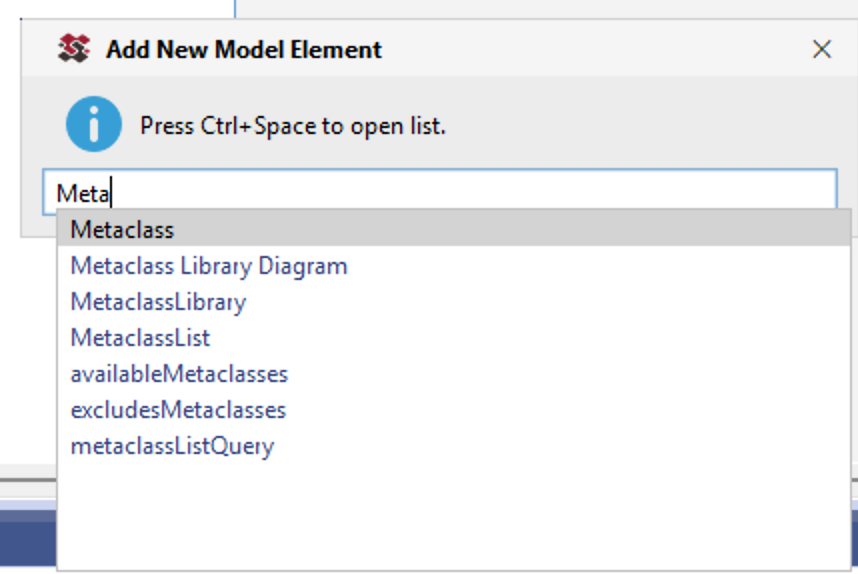
Which is why I added the Add New Model Element helper to the Power Pack. You can launch it from any element at all using a helper menu - or if you are lucky enough to be on Rhapsody 10+ already then you can use a keybaord shortcut to launch it which is even more convenient. Then you can simply type a few characters, hit Ctrl-Space and add whatever you need - its a huundred times faster than the clunky Add New Menu: