Loading Property Files Conditionally
Overview
Typically, multiple property files are loaded by a proifle that loads the first one (using a property) and then that property file contains include statements to load others:

but recently I was posed with the question 'what if i want the other way around?'. For example some 'environment specific' property files - only one of which would be used - but loading common properties from another property file:
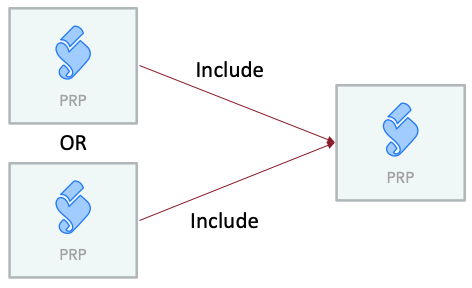
The Solution
The solution is to turn the property that loads property files (Model.Profile.PropertyFile) into a Conditional Property. It can then change its value (and hence the property that loads) based on some other value (typically a project-level property you can change).
Here is a simple one that checks the value of the property General.Model.EnvironmentSelection and then loads either a SystemEnvironment.prp file or a SoftwareEnvironment.prp file:
?<IsConditionalProperty>?<begin>$<General::Model::EnvironmentSelection>?<==>System?<?>SystemEnvironment.prp?<:>SoftwareEnvironment.prp?<end>Note that of course that property has to be set directly on the profile since it is the property that loads property files - you can't put this into a property file !
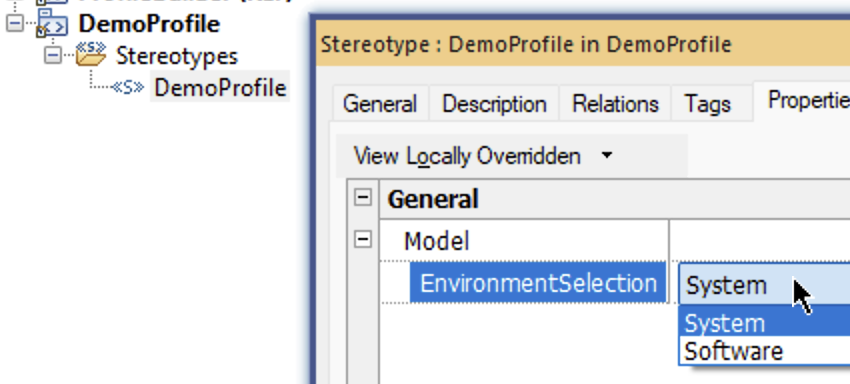
Now for the property that the Conditional Property checks - EnvironmentSelection. That also needs to be a project level property however properties added directly to profiles are never visible at project level. The workaround is to create a project-level stereotype and add the new property directly to that:
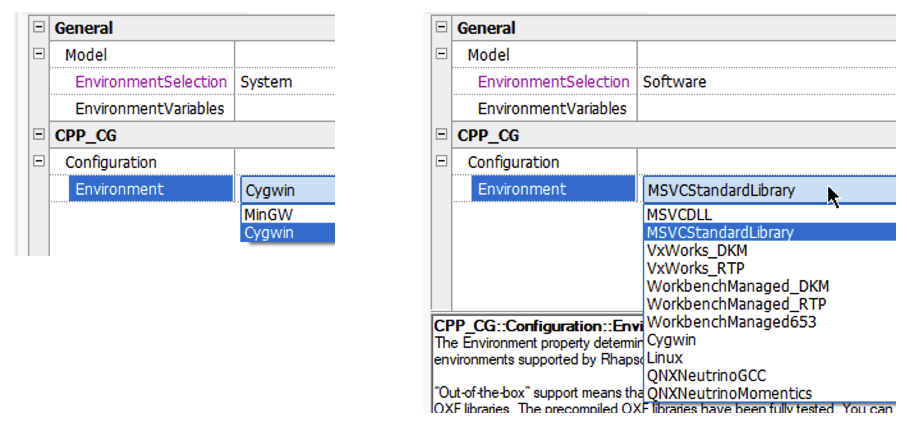
Example in use:
An example model and profile can be downloaded here.
Of course all of this is much simpler using the Profile Builder !

